WATCHING VIDEO APPS
1. How to watch YouTube, Netflix, and Amazon Prime TV
A. Using Apps on Laser Beam Pro (Required: Wi-Fi or **Hotspot and a Mouse)
i. From the interface menu of Laser Beam Pro, go to Setting > Wi-Fi and select to turn Wi-Fi on. If you don’t have Wi-Fi, you may turn your mobile device into a **Hotspot and connect Laser Beam Pro through that connection. (** It may use the data.)
ii. Connect your own Bluetooth Speaker for better sound quality. From Laser Beam Pro, go to Setting > Bluetooth and select to pair your Bluetooth speaker.
iii. Or You might also connect your own speaker system by using an *auxiliary cable (*Not included and must be purchased one at a time)
B. Using Apps on iOS Phone or Tablet (Required: *Micro HDMI to HDMI Cable + *iOS AV Lightning Adapter)
i. Simply connect your iOS device with Laser Beam Pro by using *micro HDMI to HDMI cable and *iOS AV Lightning Adapter. (*Not included and must be purchased one at a time)
ii. Connect your own Bluetooth Speaker for better sound quality. From your iOS smartphone/tablet, go to Setting > Bluetooth and select to pair your Bluetooth speaker. Make sure to Slide up bottom bezel and tap the music section to look for the connected Bluetooth Speaker to activate it, which is going to be your main sound source. The volume can be controlled from the smartphone/tablet device, not from the projector.
C. Using Apps on Android Phone/Tablet through Mirroring/Wireless connection (Required: Miracast Enabled Smartphone/Tablet)
i. This method only supports YouTube and Amazon Prime TV.
ii. From Laser Beam Pro, go to Android Mirroring and then select to turn on Smart View option from your Android Smartphone/Tablet which may be labeled as ‘Smart View’, ’Smart Mirroring’, ‘Screen Sharing’, or etc.
iii. Connect your own Bluetooth Speaker for better sound quality. From your Android smartphone/tablet, go to Setting > Bluetooth and select to pair your Bluetooth speaker. OR from Laser Beam Pro, go to Setting > Bluetooth and select to pair your Bluetooth speaker.
iv. May use data if you don’t use Wi-Fi even as using internet.
D. Using Apps on Android Phone/tablet through Cable/Wired connection (Required: MHL Enabled Smartphone/Tablet + *MHL Cable or *Micro HDMI to HDMI cable)
i. Simply connect your Android Phone to Laser Beam Pro by using *MHL or *Micro HDMI to HDMI cable.
ii. Extra *micro HDMI male receive adapter/cable may be required depending on the model of your Android smartphone/tablet. (*Not included and must be purchased one at a time)
iii. Connect your own Bluetooth Speaker for better sound quality. From your Android smartphone/tablet, go to Setting > Bluetooth and then select to pair your Bluetooth speaker. OR from Laser Beam Pro, go to Setting > Bluetooth and select your Bluetooth speaker.
E. Using Apple Computer/Laptop (Required: *Micro HDMI to HDMI Cable + *Apple Computer/Laptop Mini Display Port Adapter)
i. Simply connect your device to Laser Beam Pro by using *micro HDMI to HDMI cable and *Apple computer/laptop mini display port adapter. If screen shows blank, disconnect the cable and reconnect back again. (*Not included and must be purchased one at a time)
ii. You might also connect your own speaker system to Apple Computer/laptop using an *Auxiliary cable for better sound quality. (*Not included and must be purchased one at a time)
F. Using Windows PC/Laptop (Required: *Micro HDMI to HDMI Cable)
i. Simply connect your device to Laser Beam Pro by using *Micro HDMI to HDMI cable and make sure to change the screen monitor setting to ‘Duplicate’. (*Not included and must be purchased one at a time)
ii. Extra *HDMI male receive adapter/cable may be required depending on the model of your PC/laptop. ( *Not included and must be purchased one at a time)
ii. You might also connect your own speaker system to Windows PC/laptop using an *Auxiliary cable for better sound quality. (*Not included and must be purchased one at a time)
G. Using Roku or Apple TV (Required: *Micro HDMI to HDMI Cable)
i. Simply connect your device to Laser Beam Pro by using a micro HDMI to HDMI cable.
ii. You might also connect your own speaker system to Laser Beam Pro using an *Auxiliary cable. (*Not included and must be purchased one at a time)
iii. Some apps might NOT be running properly because of other restrictions applied by the developer. Please contact KDCUSA to find out App supports.
2. How to watch Hulu, Vudu, Crackle, HBO, and Showtime: You may follow the step E, F, or G from above instruction. (VuDu: When using Roku, please reboot Roku if you see the message saying, “HDCP unauthorized content disabled,” and play the content again.)
3. How to watch YouTube Live TV: You may follow the step B, E, or F from above instruction.
4. Other APPS: Some apps might be incompatible because of the size limitation and other restrictions applied by the developer. You may only install up to 2GB worth of apps, and the system may require you to delete one of the crucial apps to free up some space in order for you so to install the app that you wish to install.
* ALL Cables and Adapters are NOT included and must be purchased one at a time.
CONNETING WITH OTHER DEVICES
1. How to connect game consoles (Required: *Micro HDMI to HDMI Cable + *HDMI Switch Box w/AC Adapter)
i. Simply connect your game console, such as Nintendo Switch or PS4, to Laser Beam Pro by using *micro HDMI to HDMI cable and *HDMI switch box w/AC adapter.
ii. Connect your own speaker system to Laser Beam Pro by using an *Auxiliary cable for better sound quality.
2. SD card: Supports only SDHC, FAT file format. (Supports up to 1080P video files only)
3. USB: Host 2.0 Supports only FAT file format. (Supports up to 1080P video files only)
4. Bluetooth devices: Supports up to Bluetooth V 4.0. May connect up to 7 different Bluetooth devices such as speaker, keyboard, mouse, headset, etc. concurrently.
5. Audio Jack: 3.5 mm (*Auxiliary cable not induced.)
6. For external power bank, it has to be more than 5.0V 3500 mAh to use with Laser Beam Pro.
* ALL Cables and Adapters are NOT included and must be purchased one at a time.
SPECIFICATIONS
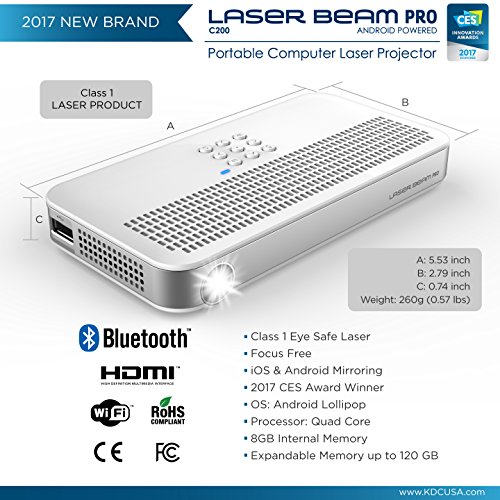
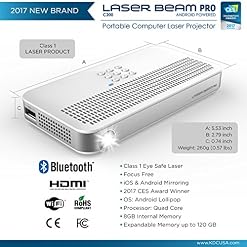
– Laser Class: Class 1
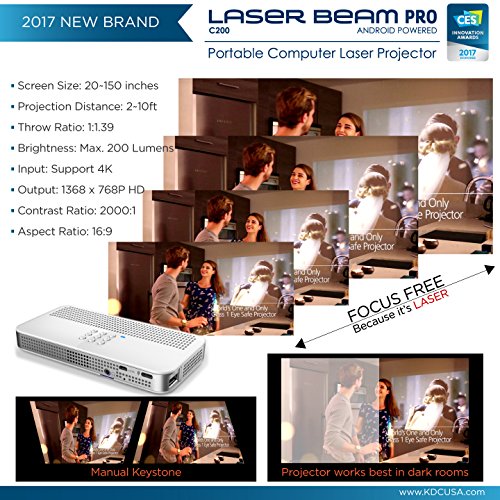
– Focus Option: Focus FREE
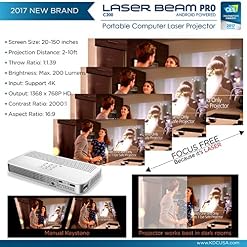
– Brightness: ANSI 100 to Maximum 200 Lumens
– Output Resolution: Native WXGA 768 x 1366 HD progressive
– Input Resolution: Up to 4K (Supports only when connected with other players via HDMI)
– Aspect Ratio: 16 : 9
– Throw Distance: 2 ft. – 15 ft.
– Throw Ratio: 1.39 : 1
– Screen Size: 20 inches – 150 inches (Works best in complete dark room)
– Contrast Ratio: 2,000 : 1
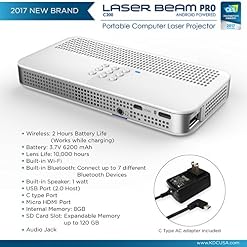
– Rechargeable Battery Capacity: 3.7V 6200 mAh
– Battery Output: 5.0V 4000 mAh
– Battery Life: 1-2 hours depends on playing contents and usage
– Power: C type charger 110 – 220 Vac.
– Keystone: Vertical manual adjustment from +23 to -23
– Built-in Wi-Fi: 802.11 a/b/g/n (2.4/5.0 GHz)
– Built-in Speaker: 1 watt
– Audio Jack: 3.5 mm (*Auxiliary cable not included)
– HDMI input: Micro HDMI (*Micro HDMI cable not inclued)
– Expandable Storage: *micro SD card slot and *USB Flash port (Supports only FAT file format)
– OS: Android Lollipop
– Processor: Quad Core
– Ram: 1 GB
– NAND Flash: 8 GB
– Dimension: 2.79 inch x 5.53 inch x 0.74 inch
– Weight: 260 g
– OP temp & Humidity: 10C-40C, 15%-85%
* ALL Cables and Adapters are NOT included and must be purchased one at a time.
KEYPAD TIPS
1. Use Power Button as Power Saving mode button: The ‘Power Saving Mode’ will be initiated if the projector is not in use and will be shut down completely if not turned back on within 20 minutes for battery saving purposes.
2. Use Back Button as Mouse Mode button: Press and hold the back button to turn on virtual mouse mode. Repeat this process to disable this mode.
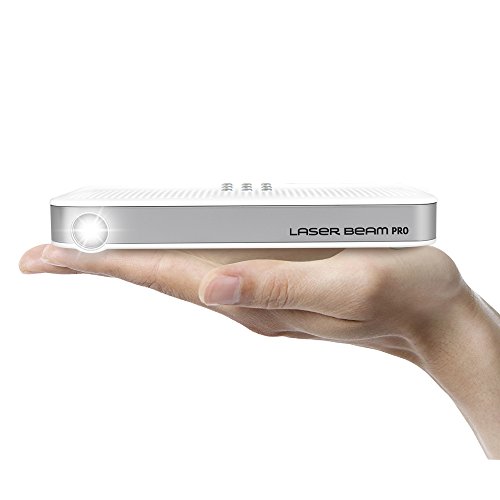
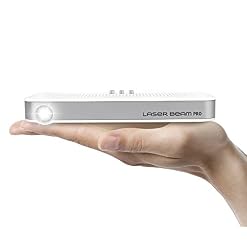
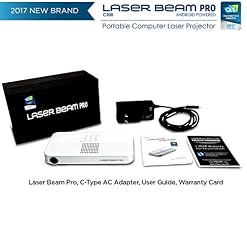
Laser Beam Pro is Focus-Free, FDA accessed (# 1611158-000) Class 1 Eye-Safe Laser, which means the projected image from around 3 ft. to 15 ft. away from the screen and diagonal 30 in. to 150 in. of screen size is completely FOCUS FREE. No need to worry about FOCUSING ever again! This projector also supports up to 4K input and 1366 x 768p progressive HD native resolution of output with maximum of 200 Lumens, which provides vibrant colors and soft images on the bright-color wall, ceiling, or projector screen and performs better in a complete dark environment
By using Wi-Fi or Hotspot, you’ll be able to surf the web and enjoy movies straight from Laser Beam Pro. You may use the apps such as YouTube, Netflix, and Amazon Prime TV after Wi-Fi or Hotspot connection is established. Built-in Bluetooth function also lets you connect a variety of other Bluetooth devices, up to 7 different devices such as Bluetooth Speaker, Bluetooth Mouse, Bluetooth Keyboard, and etc. See Product Description for more details on which apps are supported
Connect Laser Beam Pro to iOS devices or Android devices wirelessly to share photos or watch your own downloaded videos with your friends and family straight through the projector. Imagine using a cable or your own hotspot to video stream. See Product Description for more details on how to connect your mobile devices with Laser Beam Pro
Connect to different devices such as Laptop, PC, MAC, or Game Console that supports HDMI using a Certified Micro HDMI cable and/or HDMI power splitter (must purchase one at a time). See Product Description for instructions on how to connect these devices with Laser Beam Pro
It is the world’s first Laser beam projector equipped with Google’s Android Lollipop Minimal Operating System with 8 GB of internal memory, 1 GB of RAM, and more features and functions you’ll be able to use to enjoy our projector! You might also use your own USB flash drive or micro SD card, FAT (Below 32 GB), if you wish to have extra storage spaces

Intel BX80662G4400 Pentium Processor G4400 3.3 GHz FCLGA1151
TOZO Q1012 X8tw Drone RC Quadcopter Altitude Hold Headless RTF 3D 360 Degree FPV Video WiFi 720P HD Camera 6 axis 4CH 2…
Casio MS-80B Standard Function Desktop Calculator
DJI Spark Remote Controller, Black (CP.PT.000792)
Dell Inspiron 3650 High Performance Desktop PC, Intel Core i3-6100 Processor 3.70 GHz, 8GB RAM, 1TB 7200RPM HDD, DVD +/- RW, WIFI, Bluetooth, HDMI, VGA, Windows 7 / 10 Professional
Scout Dual-Band ADS-B Receiver for Inflight Weather & Traffic - Made for ForeFlight by uAvionix
NAXA Electronics NPB-268 Portable CD/Cassette Boombox (Silver/Black)
Helect H1002 2-Line Engineering Scientific Calculator
Dell Inspiron 7000 15.6" Convertible 2-in-1 FHD Touchscreen Laptop, 7th Intel Core i5-7200U Processor, 8GB DDR4 RAM, 256GB SSD, Bluetooth, HDMI, 802.11AC, Win 10
Texas Instruments TI-84 Plus CE Lightning Graphing Calculator
Logitech Harmony 650 Infrared All in One Remote Control, Universal Remote Logitech, Programmable Remote (Silver)
Univivi Infrared Illuminator, 850nm 6 LEDs 90 Degree Wide Angle IR Illuminator for Night Vision,Waterproof LED Infrared Light for IP Camera,CCTV Security Camera
ViewTV All in One Free Television Bundle with AT-163 Digital TV Converter Box with Recording PVR Function and 150 Mile Outdoor Amplified Antenna with 360° Rotation
Talentcell Rechargeable 6000mAh Li-Ion Battery Pack for LED Strip and CCTV Camera,12V DC Portable Lithium Ion Battery Bank with Charger,Black
Apple iMac 21.5in 2.7GHz Core i5 (ME086LL/A) All In One Desktop, 8GB Memory, 1TB Hard Drive, MacOS 10.12 Sierra (Renewed)
Intel Celeron G1840 Processor - BX80646G1840
Digital Stream Analog Pass-Through DTV Converter Box
Rabing Mini Foldable RC Drone FPV VR WiFi RC Quadcopter Remote Control Drone with HD 720P Camera RC Helicopter
Apple Watch Series 3 - GPS - Silver Aluminum Case with Fog Sport Band - 42mm
IVIEW-3200STB Multimedia Converter Box. Digital to Analog, QAM tuner, with Recording function
GoPro Karma Battery (GoPro Official Accessory)
Soft Digits 50 in 1 Action Camera Accessories Kit for GoPro Hero Accessory Bundle kit for GoPro Hero 8 7 6 5 4 Xiaomi yi…
Cheerwing Syma X5SW-V3 FPV Explorers2 2.4Ghz 4CH 6-Axis Gyro RC Headless Quadcopter Drone UFO with HD Wifi Camera (White)
PERLESMITH TV Wall Mount Bracket Full Motion Dual Articulating Arms for Most 37-70 inch LED, LCD OLED Flat Curved TV…
HC-RET in-Ear Earbuds Headphones with Mic for All iPhones Samsung Mobiles Tablets MP3 Players and More