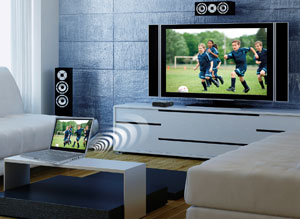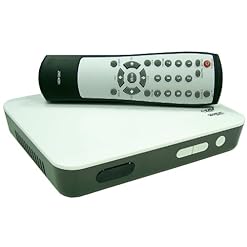
Actiontec’s ScreenBeam Wireless Display Adapter Kit allows users to beam the display from their laptop, tablet or smartphone screens onto almost any HDTV. Use ScreenBeam to share your videos, photos, music or websites on your HDTV. ScreenBeam’s brilliant HD quality is HDMI-certified for a full 1080p High Definition connection to your HDTVs and projectors. ScreenBeam is the only wireless display solution supporting Windows 7 and 8 laptops, as well as Wi-Fi certified Miracast devices like tablets, smartphones and Intel WiDi 3.5 and higher. With ScreenBeam, users aren’t limited to purchasing just one type of PC or forced to buy multiple receivers. ScreenBeam does not require an existing wireless network or line of sight to your HDTV.
Minimum System Requirements: For general PC use, web browsing, etc. Processor: Intel Core 2 Duo CPU 2.5GHz+ or AMD A4+CPU. 2GB+ RAM Memory. Recommended for video playback: Intel Core CPU 2.2 GHz+ or AMD A6+ CPU, 3GB RAM Memory
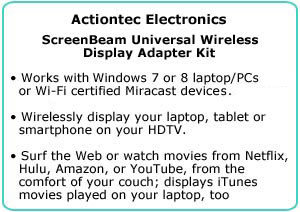
ScreenBeam is the only wireless display solution that works with Windows 7 or 8 laptop or PCs, and Wi-Fi certified Miracast devices. Wirelessly display your laptop, tablet or smartphone on your HDTV. Surf the Web or watch movies from Netflix, Hulu, Amazon, or YouTube, from the comfort of your couch – ScreenBeam displays iTunes movies played on your laptop, too.
How Does It Work?
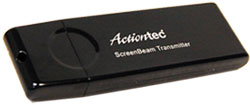
It’s simple. The ScreenBeam receiver receives wireless display signals from your laptop, PC, smartphone or tablet and displays your device’s screen on your HDTV. Actiontec has included a USB transmitter and software for laptops and devices that aren’t Miracast-compatible (such as older laptops).
Compatibility
ScreenBeam kit is for owners of laptops and Ultrabooks without wireless display, or Wi-Fi certified Miracast tablets and smartphones like Google Nexus 4, HTC One, Samsung Galaxy S3, Samsung Galaxy S4, Sony Xperia Z. Owners of laptops/ Ultrabooks with WiDi 3.5 and higher must purchase the ScreenBeam Pro.
Easy to Set Up
Setting up wireless HD entertainment is easy. Connect your ScreenBeam is four simple steps:
- Step 1: Connect the ScreenBeam receiver to your HDTV with an HDMI cable.
- Step 2: Load the ScreenBeam software onto your computer.
- Step 3: Connect the ScreenBeam transmitter to a USB port on your computer.
- Step 4: Pair the ScreenBeam receiver and transmitter.
Congratulations – you are now able to wirelessly display your laptop or device screen on your HDTV.
Minimum System Requirements
- General PC Use, Web Browsing, etc.: Processor: Intel Core 2 Duo CPU 2.5GHz+ or AMD A4+CPU. 2GB+ RAM Memory.
- Video Playback: Intel Core CPU (i3, i5, i7) 2.2 GHz+ or AMD A6+ CPU, 3GB RAM Memory
Why ScreenBeam?
ScreenBeam is a more universal solution than anything else that is in the market. It works with Windows 7 or 8 laptops and Miracast-enabled smartphones, tablets, or laptop PCs. It works with Intel WiDi devices, 3.5 and higher, and it’s HDMI-certified for a prime quality connection to your HDTV or projector. ScreenBeam creates a dedicated wireless connection to your HDTV, and does not require an existing network or line of sight.
Surf and Share from the Couch
Anything you’ll be able to do on your laptop, you’ll be able to now do on your HDTV. Users can surf the Web or watch movies from Netflix, Hulu, Amazon, or YouTube from the comfort of their couch. It also displays iTunes movies played on your laptop, too.
Premium Audio and Visual Experience
ScreenBeam wirelessly supports 1080p full HD video and HD audio, as would a fast HDMI cable. Get the HD picture quality and entertainment experience, without the cables.
Independent of your Wireless Network
ScreenBeam creates a dedicated wireless display connection to your HDTV that does not require an existing wireless network or line of sight. So even though you do not have a wireless router at home, you’ll be able to still enjoy HD entertainment streamed wirelessly from your PC, laptop, or portable devices.
Versatile, Yet Affordable
ScreenBeam offers you more than most receivers that only reinforce one wireless standard, for less. The ScreenBeam kit contains everything you wish to have to configure a wireless display setup between your computer and HDTV.
What’s in the Box?
ScreenBeam display receiver, USB transmitter, high-speed HDMI cable, energy-efficient power supply, ScreenBeam software CD, Quick Start guide.
Wirelessly beam the display of your laptop, tablet or smartphone screens onto almost any HDTV
Brilliant HD quality. Share your videos, pictures, music or surf the web on your HDTV at up to 1080p.
Supports Windows 7 or 8 laptops/ PCs or Miracast-compatible devices
For notebooks and Ultrabooks without Intel WiDi 3.5 and higher
Also works with Wi-Fi Certified Miracast smartphones and tablets

Studebaker Portable Retro Home Audio Stereo AM/FM Radio & Cassette Player/Recorder with Aux Input Jack & Built in Speakers (Gold)
ASAs Color E6B Flight Computer
OMOTON SmoothArmor 9H Hardness HD Tempered Glass Screen Protector for Apple iPhone 8 Plus/iPhone 7 Plus, 2 Pack
Simple Mobile Samsung Galaxy J3 Luna Pro 4G LTE Prepaid Smartphone with Free $50 Airtime Bundle
DIGITNOW Video Capture VHS to Digital DVD Converter with AV/Scart Cable for Windows
Mediasonic HOMEWORX 180STB HDTV Digital Converter Box with Recording and Media Player Function - Renewed
Tyler Portable Neon Green Stereo CD Player with AM/FM Radio and Aux & Headphone Jack Line-In (TAU105-NGRN)
DJI High Capacity Phantom 4 Series P4-Intelligent Flight Battery, White (CP.PT.000601)
Bose Solo 5 TV Sound System with Universal Remote Control
ViewTV All in One Free Television Bundle with AT-163 Digital TV Converter Box with Recording PVR Function and 150 Mile Outdoor Amplified Antenna with 360° Rotation